We built an idle game you can play in the browser, in three days, with an AI.
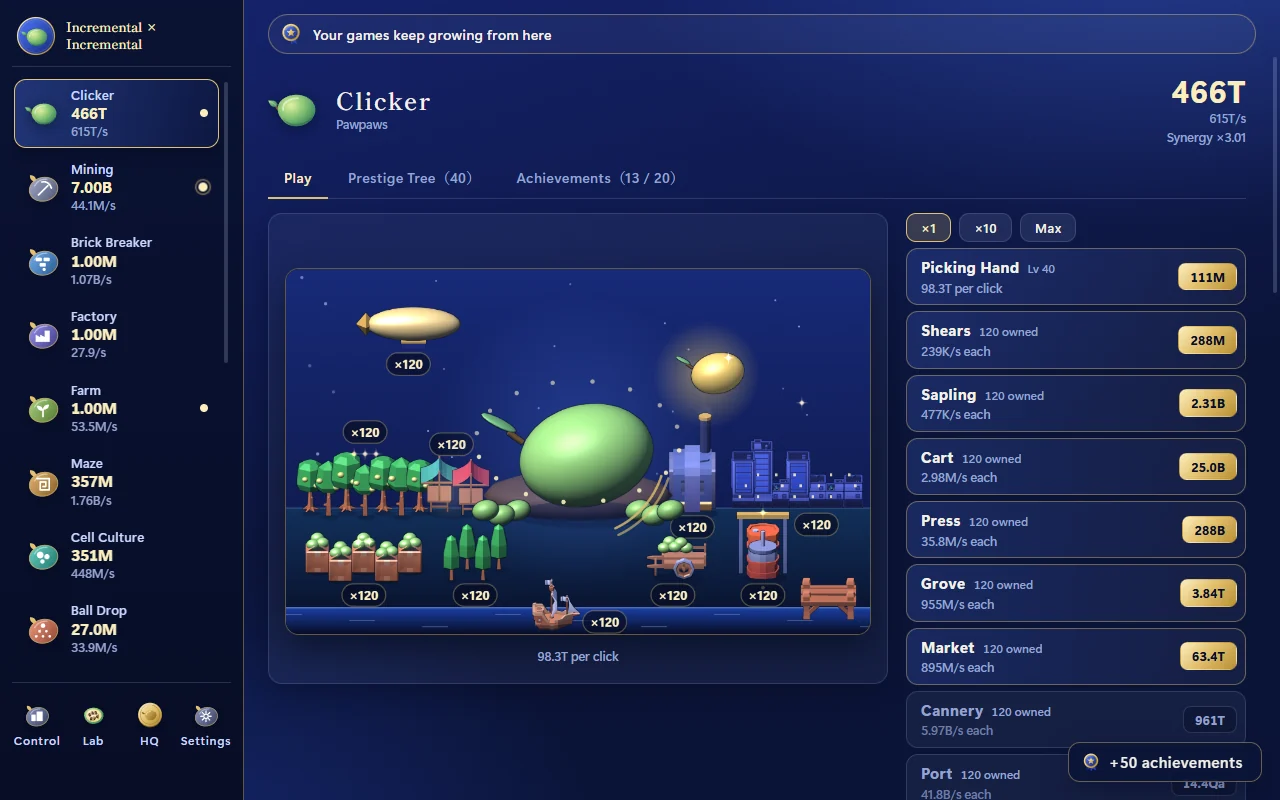
It is called "Incremental × Incremental". It starts with clicking a single fruit, then 16 idle games (also called incremental or clicker games) grow, and crossing two of them produces a new one. The program is about 15,000 lines and there are 249 pieces of art. The AI (Claude Code) did the implementation, and a human gave direction and made the calls.
Something that ran came quickly. The trouble came after that. This article lists the 10 problems that actually came up in solo game development with AI and how each was fixed, along with the development history and cases published by other developers.
You can play the game here
No install and no sign-up. It is a mouse-driven game for desktop browsers, available in English and Japanese.
Play Incremental × IncrementalAbout 7 MB in total, with sound. Saves stay in your browser and nothing is sent anywhere. It has not been tested on phones.
The short version: 10 problems and fixes
The details come later. Here is the list first.
| # | Problem | Fix |
|---|---|---|
| 1 | Work starts before the spec is settled | Hand over a spec that marks undecided items as undecided. The AI decides provisionally and keeps a list of those decisions |
| 2 | As the code grows, names collide and another screen breaks | Make it a rule to search for a name before adding it |
| 3 | In a new conversation, the AI does not remember what was decided | Keep rules and past mistakes, briefly, in a file that is loaded every time |
| 4 | "I checked everything" covered only part of it | Build a tool that captures every screen as a whole page, and check from images |
| 5 | The screen being checked was the old art | Start loading assets at launch. Capture only after loading is done |
| 6 | A check overwrote a save that was being played | Use only a throwaway environment when setting up state to check |
| 7 | Progress is too fast, and slowing it down makes it stall | Use one kind of growth formula. Build a simulated run that plays 100 hours |
| 8 | The capture tool hangs in an infinite loop | Cap the loops and add a timeout to the tool |
| 9 | The art does not match and looks cheap | Render every asset with the same light and colors. Settle the method on one game before spreading it |
| 10 | Asset licenses and AI-made assets | Record the source, license and whether it is AI-made for every asset |
What they share is that none of them was a case of the AI being unable to write the code. The trouble was in deciding, remembering and checking.
The game: Incremental × Incremental
Idle games are a genre where watching numbers grow is the fun. Resources increase through clicks and passing time, and you spend them to increase faster.
This one has you raise 16 of those games together. The plan rested on three ideas.
- Each game is fun to grow on its own
- Crossing two games produces a new game
- As you progress, your view rises from playing single games to running the whole cluster
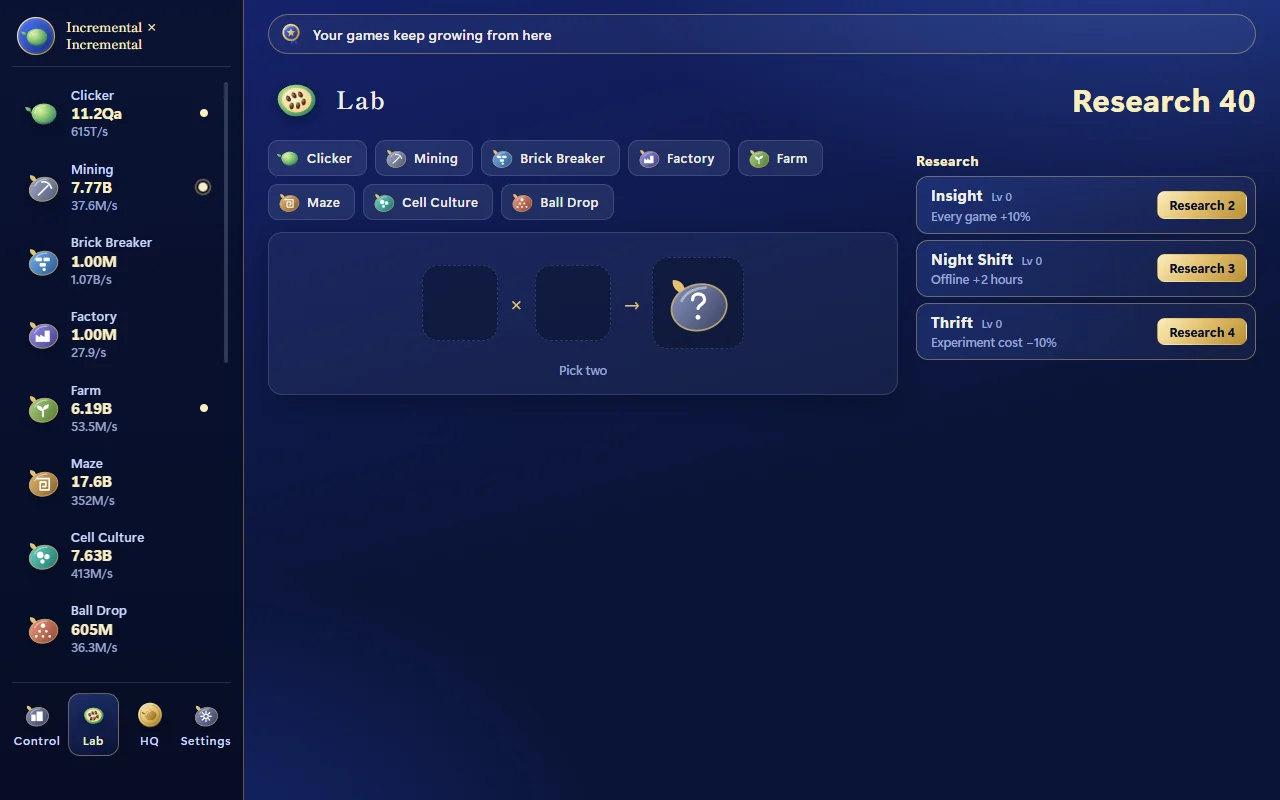
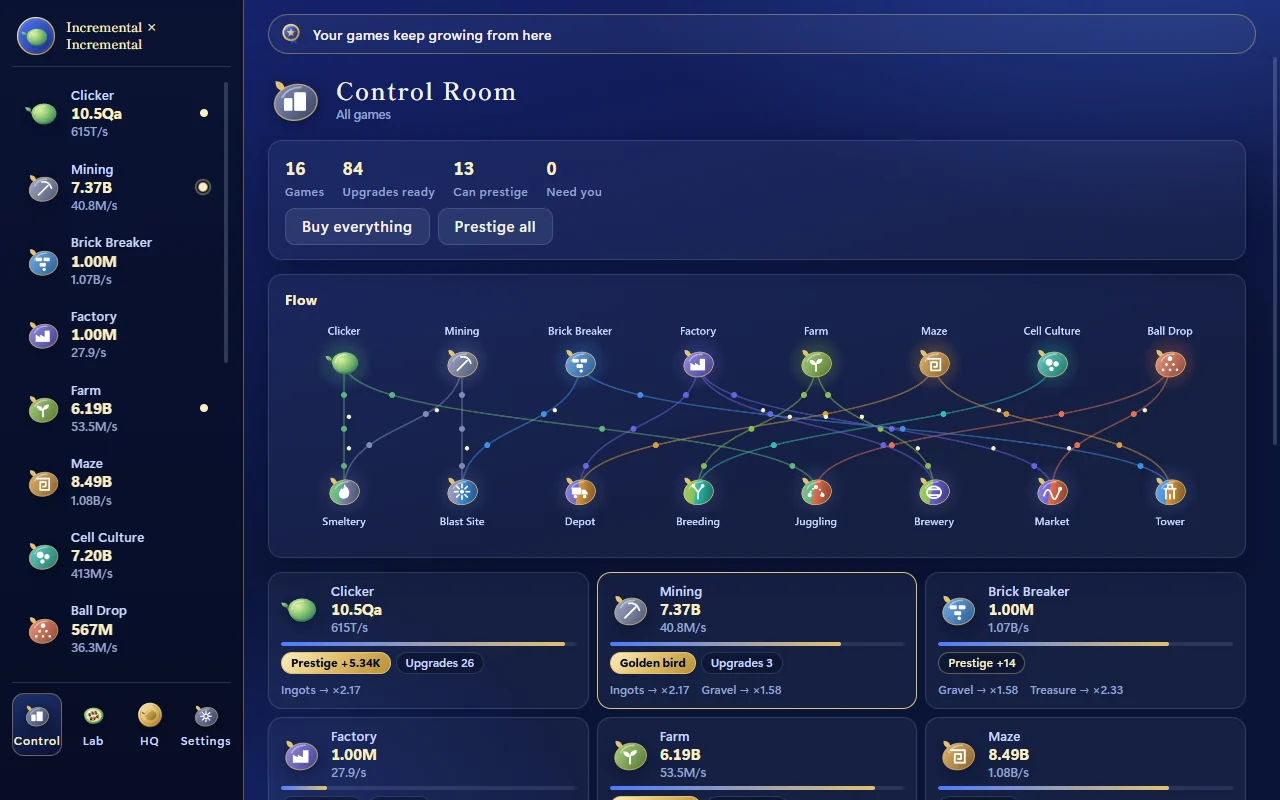
There are eight base games (a clicker, mining, a brick breaker, a factory, cell growth, farming, a maze and a ball drop) and eight fusion games born from them (a smeltery, a blast site, a depot, breeding, juggling, a brewery, a market and a tower). Above those sit three layers: the lab, the headquarters and the new world. Once you have three games, a Control Room also opens, showing everything on one screen.
| Item | Current state |
|---|---|
| Games | 16 (8 base, 8 fusion) |
| Languages | Japanese and English (about 1,000 strings) |
| Program | About 15,000 lines of plain HTML / CSS / JavaScript with no build step |
| Assets | 249 images and 60 sound effects |
| Size | About 7 MB for the browser package |
| Network | None. No analytics and no ads |
| Development time | Three days (10 to 12 October 2026) |
Timeline: what happened in three days
The starting point was a pitch and a basic spec worked out in conversation. The spec separated what was decided, what would be tried and checked, what was undecided and what would not be done, and it stated that undecided items must not be quietly turned into provisional implementation specs. The numbers, the fusion combinations and the technology were all undecided.
The way of working was agreed at the start. The AI decides undecided items provisionally and asks only when it is unsure. Provisional decisions go on a list. If there is nothing to confirm, the work continues without interim reports.
Day 1: the foundation and 13 games
The foundation came first: big-number math, upgrades, prestige, saving and offline progress, plus the eight base games. Five fusion games followed. Partway through, the goal rose from a playable prototype to each game being deep enough to stand on its own, and the 13 games were built out one after another.
Day 2: length and late-game content
Playing it showed that progress was too fast. The target length went to over 20 hours and then to around 100 hours. Simply slowing it down would be dull, so late-game content was added so that something new appears every few hours. Three more fusion games brought the total to 16.
Day 3: a new look and getting ready to publish
The plan to use prepared character art was dropped, and the look was redone in calm navy and gold. Art drawn only from shapes was replaced with art made from assets. Sound effects were swapped, milestone scenes and an ending were added, and every screen was checked in Japanese and English.
As finishing work, the overall view and the feel of play were improved. A "Control Room" was added: one screen that shows the income and growth of every game, the number of affordable upgrades and good moments to prestige. When buying an upgrade makes income per second jump by 1.5 times or more, the multiplier now pops up over the picture, and the bar at the top always shows progress toward the next game. In Juggling, leaving it to the partner no longer reduces the streak you built yourself.
The waits in the middle of the game were shortened too. With the conditions for unlocking new games moved earlier, the simulated run showed the longest stretch with nothing new going from 8.2 hours to 4.6 hours, and the time to the ending going from about 93 hours to about 76 hours (both are values from simulated runs and not time played by a human). So that watching the Control Room alone would not be enough, a "golden bird" was added that sometimes flies into the picture of one of the games. Catching it on the screen of that game gives a sizable reward.
Finally it was packaged for the browser.
10 problems in solo AI game development
This is the main part. The problems are ordered by stage of development and not by when they happened. Each has what happened, how it was fixed, and a case from elsewhere.
1. Work starts before the spec is settled
WHAT HAPPENED
In solo game development, not everything is decided when you start. Here the numbers, the fusion combinations, the unlock order and the technology were open. If you ask an AI to just make it good, it fills the open parts without saying so. Later you cannot tell which parts a human decided and which the AI filled in.
THE FIX
The spec itself separated decided items from undecided ones. On top of that, the agreement was that the AI decides undecided items provisionally and keeps a list of them. When revisiting after playing, the list shows which decisions were provisional.
ELSEWHERE
A developer who built a puzzle game with Claude Code wrote that, because the AI pushes implementation forward so fast, detailed requirements and control over the scope and size of tasks were needed[1]. Another developer who built a web game with chat-based AI tools wrote that the AI interprets prompts however it wants, so prompts have to be very specific[2].
Deciding everything up front and handing over undecided items as undecided point in opposite directions, but they aim at the same thing: not leaving the parts the AI filled in invisible.
2. As the code grows, names collide and another screen breaks
WHAT HAPPENED
A style rule added for the brewery game was given the same name as one already used by the ball drop screen. The ball drop screen shrank to 12 pixels and rotated at an angle. The work was on the brewery, and a different game broke.
THE FIX
The name was changed. Then a rule was written down: before adding a name to the styles, search for the same name. Past 10,000 lines, neither the AI nor the human can hold the whole thing in mind. A search step replaces remembering.
ELSEWHERE
The puzzle game developer above wrote that the repository became hard to follow and tended to get messy because the AI kept implementing, and named written coding rules and term definitions as the countermeasure[1].
3. In a new conversation, the AI does not remember what was decided
WHAT HAPPENED
Three days of development do not fit in one conversation. In a new conversation the AI starts without knowing what was decided before or what went wrong before. It makes the same mistake again.
THE FIX
Rules and past mistakes went into the project's instruction file (CLAUDE.md in Claude Code). Besides policies such as "edit Japanese and English together" and "do not over-explain in the text", it holds the mistakes themselves as reasons: "search before adding a name; adding a duplicate once broke another screen" and "do not overwrite saves in the browser; this has happened".
OFFICIAL GUIDANCE
The Claude Code documentation explains that each session begins with a fresh context, that CLAUDE.md is loaded at the start of every conversation, and that the more specific and concise the instructions are, the more consistently they are followed[3]. Longer is not better.
4. "I checked everything" covered only part of it
WHAT HAPPENED
The AI reported that it had checked everything. It had looked only at the contents of the art and not at the whole page. Overlapping text and empty space on wide screens only show up when you look at the whole page. Unless asked, the AI does not look at the result of its code as a screen.
THE FIX
A tool was built to capture every screen as a full page: the 16 games, the lab, the headquarters, the settings and the milestone scenes, one image each in Japanese and English. The AI checks from those images and the human looks at the same ones. The way of checking became a tool.
ELSEWHERE
An article on making agents prove their work says that an agent's claim that something is fixed is frequently wrong, and recommends taking a screenshot after each claim of success, keeping reference images in the project and capturing console errors as well. It also notes that screenshots miss flicker and timing problems[4].
5. The screen being checked was the old art
WHAT HAPPENED
After the art was replaced with new assets, the screens were captured to check them. The captures showed the old art. Assets started loading only when a game was opened, so the old art stayed on screen for the few seconds until loading finished. Something that had been fixed was being checked in its unfixed state.
THE FIX
Asset loading was moved to launch. Players also no longer see the old art for a moment when opening a game. What looked like a problem with checking was also a problem with the game.
6. A check overwrote a save that was being played
WHAT HAPPENED
Checking a late-game screen needs a late-game state. The screen the AI touched to set up that state held the save the human was actually playing. A browser game opened at the same address uses the same save.
THE FIX
The rule became: when setting up state to check, use only a throwaway environment that does not touch the regular save. A tool opens the game in that environment and captures early, middle and late scenes. On the screen the human is playing, the AI only looks.
This kind of accident is not limited to games. If you hand work to an AI, keep the place for checking separate from the real one.
7. Progress is too fast, and slowing it down makes it stall
WHAT HAPPENED
How the numbers grow decides whether an idle game is fun. The first version progressed too fast. Adjusting the numbers to slow it down made it either run away or stop dead at some point. The cause was a mix of formulas that double and formulas that grow as a power.
THE FIX
The growth formulas were unified as powers. Then a simulated run was built that plays 100 hours of the game automatically. It was too slow at first and was brought down to under four minutes. After every change to the numbers, the run shows where progress stalls or runs away.
One problem remained: just being slower is dull. A formula does not solve that. Late-game content was added so that something new appears every few hours.
A USEFUL REFERENCE
For idle game math, Anthony Pecorella's "The Math of Idle Games" is widely read. It explains that costs typically grow exponentially while production grows linearly or polynomially, so production leads early and costs catch up later, and that multipliers and prestige are tools for temporarily shifting that balance[5].
8. The capture tool hangs in an infinite loop
WHAT HAPPENED
The tool stopped in the middle of capturing screens. A loop that stacks a pile inside the art never ended under one condition. A person watching would notice, but an automated job just stays stuck in silence.
THE FIX
The loops were capped and the capture tool got a timeout. The longer the work you hand to an AI, the more you need something that notices when it has stopped.
9. The art does not match and looks cheap
WHAT HAPPENED
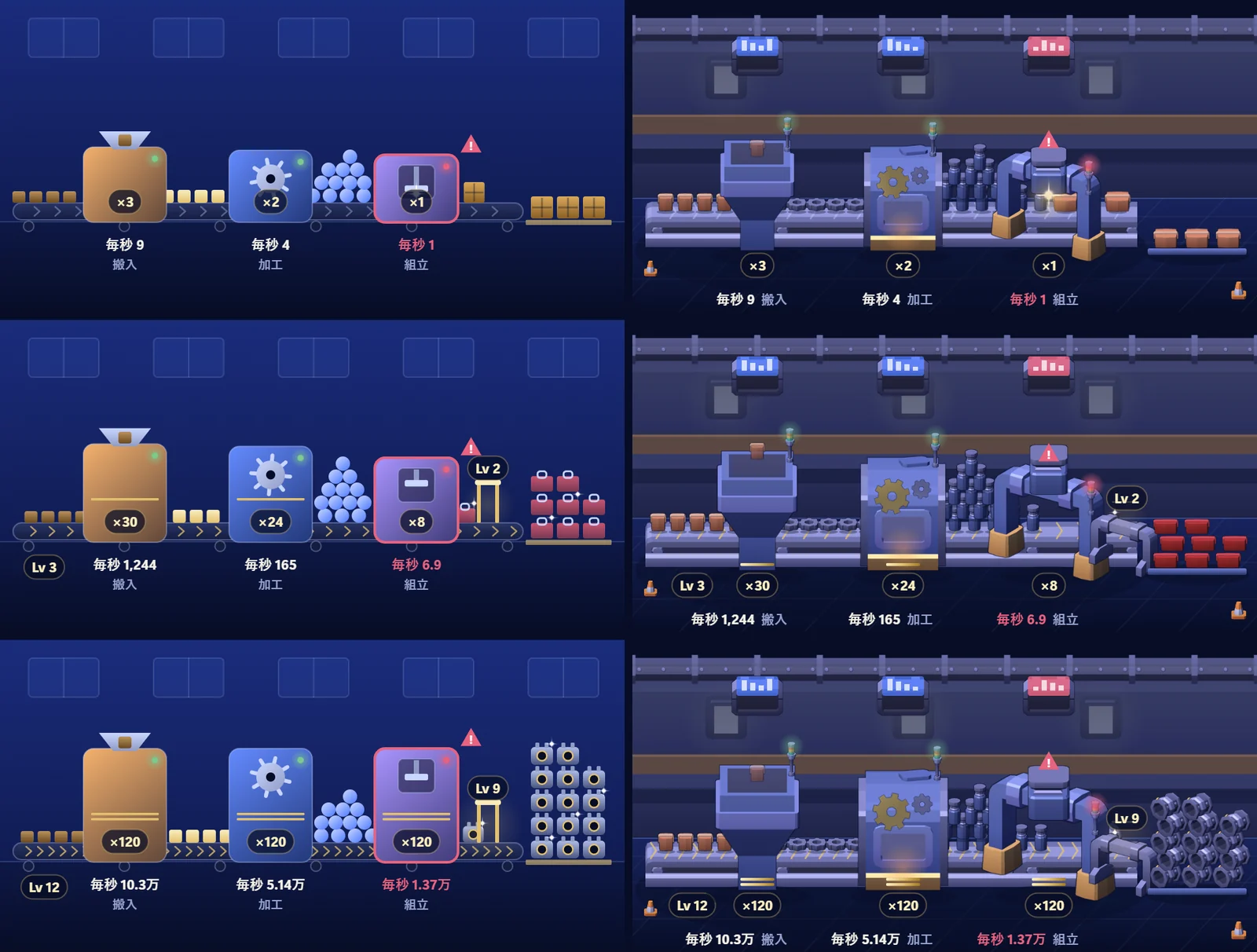
The first art was drawn only from shapes. It worked but looked like it was made from rough placeholders. Swapping in downloaded assets brought a different problem: each asset had its own light direction and colors, so they looked out of place side by side. The prepared character art was dropped in the end.
THE FIX
No 3D software was used. A small rendering tool was written to turn CC0 3D models into 2D art under one fixed setup: a camera looking down 24 degrees from the front, a single light from the upper left front, and a thin dark navy outline. Colors are repainted at render time to fit the navy and gold screen. Where no model fits, the same tool builds the object from boxes and cylinders. Since everything is drawn under the same light, nothing looks out of place.
The order of work mattered too. The method was settled on one game, the factory, which was redone three times. Once the method was fixed it became a tool and was spread to the other 15 games, which went quickly.
Using assets did not always make things better. The smeltery's furnace looked boxy and plain after being replaced with a downloaded model, so it went back to the custom shape.
ELSEWHERE
The blog of a company that sells a game art generation service says that most AI generators solve the individual asset problem but not the consistency problem. It is promoting its own product, which should be discounted, but the point that single images are good while the set does not match fits what happened here[6].
10. Asset licenses and AI-made assets
WHAT HAPPENED
When you look for missing assets on distribution sites, the license differs per asset. In this project, 13 of the 3D models used are declared by their source as made with AI. Working out afterwards whether an asset was allowed, or which ones are AI-made, is hard.
THE FIX
Each time an asset was taken, its license was checked individually and its source, license and AI status were written into a list. Assets with an unclear license were not used. The 3D models behind the art are CC0 (Kenney and 3DAssets.dev), the sound effects are CC0 (Kenney) and the fonts are under the SIL OFL. The list ships with the game.
WHERE THE ASSETS CAME FROM
- Kenney: 3D models and sound effects. CC0
- 3DAssets.dev: 3D models. The ones used are CC0, and all 13 are declared by the source as AI-made
- Shippori Mincho and Zen Maru Gothic: fonts. SIL OFL 1.1
- License texts: CC0 1.0 / SIL Open Font License
Terms on distribution sites can change. Check the page of each individual asset before using it.
OFFICIAL GUIDANCE
Kenney states on its site that its assets are CC0, can be used in commercial projects and do not require attribution[7].
Publishing on Steam comes with rules about AI. According to the Steamworks documentation, the Content Survey has a section on AI covering content that ships with the game and that players consume, such as artwork, sound, narrative and localization. Content created with the help of AI tools during development is called pre-generated, and content created while the game is running is called live-generated. If either is used, the developer has to describe it[8]. This game is not on Steam yet, but the AI-made assets are listed so they can be disclosed when it is.
What could not be left to the AI
Lined up, most of the 10 problems can be fixed with tools and rules. What triggered the fixes came from somewhere else.
Direction changed during development when a human looked at the screen and said what they thought. Progress is too fast. This part looks cheap. The empty space stands out on a wide screen. Each of those remarks only came from looking.
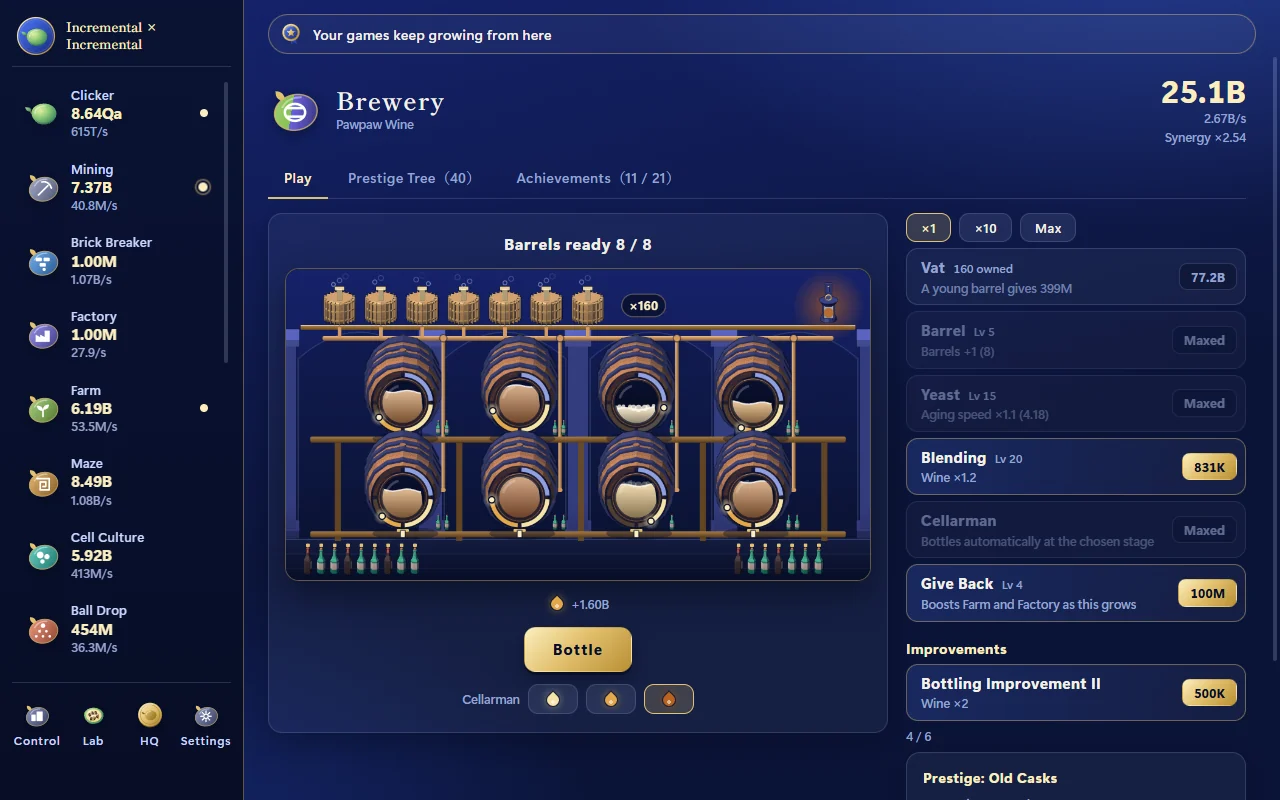
The brewery is an example. The first version showed the state of each cask with a word such as "aging". It worked correctly. It was redone after the remark that it was leaning on text. The casks got round windows, and the color, the level and the bubbles of the drink show how far it has aged. The AI can draw a round window when asked. It did not say on its own that getting by with text was not enough.
Other developers describe something similar. The developer who built a web game with chat-based AI tools wrote that after a few hundred prompts, with the project near completion, the AI could no longer identify the main issue, and the final 25% was finished by reading the code and tuning it by hand[2].
The same thing happened in the first experiment on this site. A game left entirely to an AI ran but was not fun. The score went up after a human proposed improvements (EXP-001: I let AI handle the whole game build).
A checklist for getting started
From this project, here is what is worth doing early when you build a game solo with AI.
- Write undecided items in the spec as undecided. Have the AI list what it decided provisionally
- Keep rules and past mistakes, briefly, in an instruction file that is loaded every time
- Have the AI search for a name (function, style, file) before adding it
- Separate the environment for checking from the one you play in. Let the AI touch only the checking one
- Build a tool that captures every screen early. Accept "checked" only as images
- Put loop caps and timeouts into automated jobs
- For a game with numbers, build a simulated run that plays many hours
- Settle the art method on one game before spreading it
- Record the source, license and AI status every time an asset goes in
- Play it yourself. Only someone who has played can give an impression
What was checked and what was not
Looking like it works and having been checked are different things. Every oversight in this project happened somewhere that had not been checked. So the same split is given for the game itself.
Checked:
- The 16 games, the Control Room, the lab, the headquarters, the settings and the milestone scenes, one screen each in Japanese and English (1280 by 800 pixels)
- Tests of the number math, a launch check and simulated runs
- Opening it as placed on this site, with no failed loads, no errors and no network requests to other hosts
Not checked:
- A human playing the final version from the start to the ending. The balance of the numbers has only been seen through simulated runs
- The effect when the golden bird is caught, the multiplier pop-up and the motion of the Control Room diagram (seen only as still images)
- Display and controls on phones and tablets. It is built for a mouse
- Browsers other than Chromium-based ones (Firefox, Safari)
In other words, this game is not a finished product. It is what three days brought to a playable state in the browser. You may find places where it gets stuck or where the numbers are off.
Play it and see
It runs as is in a desktop browser.
Play Incremental × IncrementalSaves stay in the browser you opened this site with. The settings screen can export and import a save.
Frequently asked questions
- Can an AI build a game on its own?
- The AI (Claude Code) did the implementation: the program, the text and the rendering of the art. A human decided what to build, what was missing and where to stop. Every change of direction in this project started with a remark a human made after actually looking at the screen.
- How long does solo game development with AI take?
- In this case it took three days to get an idle game with 16 games inside it running in the browser. Tuning by a human playing the final version from start to ending is not finished. Getting something that runs and getting something finished are different lengths of time.
- Where did the art and sound come from?
- The art was rendered from CC0 3D models (Kenney and 3DAssets.dev) with a small custom rendering tool that gives every model the same light and colors. Sound effects are CC0 assets from Kenney and the fonts are under the SIL OFL. Every asset is listed with its source and license.
- Can a game that uses AI-made assets be published or sold?
- Yes, if the license of each asset allows it. Thirteen of the 3D models used here are CC0 assets that their source declares as made with AI. Steam requires developers to disclose AI-generated content in the Content Survey, so you need a record of which assets are AI-made.
- How should the numbers in an idle (incremental) game be balanced?
- In this project, formulas that double and formulas that grow as a power were mixed, so progress either ran away or stalled at some point. The fix was to use power formulas throughout and to build a simulated run that plays 100 hours of the game in under four minutes.
WHAT REMAINED
Checking is harder than writing
In three days the AI wrote about 15,000 lines of program and 16 games. Writing is no longer the hard part.
The hard parts were keeping undecided things visibly undecided, making rules survive a change of conversation, and turning "it runs" into "it was checked". Every problem that tools or rules fixed was fixed by moving the checking from human attention into a mechanism.
This is a record of one game, three days, one person and one kind of AI. A different genre, different tools or a team would run into different problems.
Let checking keep up with the speed at which the AI builds. That was what solo AI game development needed: tools and rules for exactly that.
EXPERIMENT DATA
Development data
- Period
- 10 to 12 October 2026 (three days)
- AI used
- Claude Code
- Roles
- Human: direction and decisions. AI: implementation, checking and records. The draft of this article was also written by the AI (Claude Code), and a human edited and reviewed it
- Technology
- Plain HTML / CSS / JavaScript with no build step. Art rendered with Python and Pillow
- Scale
- 16 games, about 15,000 lines of program, 249 images, 60 sound effects and about 1,000 strings
- Assets
- 3D models from Kenney and 3DAssets.dev (CC0), sound effects from Kenney (CC0), and the fonts Shippori Mincho and Zen Maru Gothic (SIL OFL 1.1). Thirteen of the 3D models are declared by their source as AI-made
- Release form
- Browser version, about 7 MB, no network requests. Saves stay in the browser
- Still to do
- A full human playthrough of the final version, checks on phones and non-Chromium browsers, and a Steam release
Sources
External articles are cited only for what they state. Personal accounts are one person's experience, and company blogs are written to promote their own products.
- kubo_gene, "Claude CodeでVibe Coding!!!(Tシャツは貰えないけど)", Zenn, July 2025 (in Japanese). https://zenn.dev/kubo_gene/articles/a9d08386186342
- Nino Ross Rodriguez, "Vibe Coding a Web Game from Scratch — Fast, Fun, and Occasionally on Fire", DEV Community. https://dev.to/oninross/vibe-coding-a-web-game-from-scratch-fast-fun-and-occasionally-on-fire-kmd
- Claude Code documentation, "How Claude remembers your project". https://code.claude.com/docs/en/memory
- "Visual Verification: Making Agents Prove Their Work", paddo.dev, December 2025. https://paddo.dev/blog/multimodal-validation-visual-verification/
- Anthony Pecorella, "The Math of Idle Games, Part I", Game Developer, October 2016 (first published on Kongregate's developer blog). https://www.gamedeveloper.com/design/the-math-of-idle-games-part-i
- Makko AI, "AI Game Art Generator: Characters, Backgrounds, Animations and Why Consistency Is the Hard Part", March 2026 (blog of a company that sells an image generation service). https://blog.makko.ai/ai-game-art-generator/
- Kenney, "Support" (explanation of asset licensing). https://kenney.nl/support
- Steamworks documentation, "Content Survey" (section on AI). https://partner.steamgames.com/doc/gettingstarted/contentsurvey
Related records on this site: EXP-001 I let AI handle the whole game build / EXP-003 How far can one sentence take an AI build?